The channel identifier (Channel ID) uniquely identifies a YouTube channel. Knowing the channel ID can be useful for various reasons:
Consistency: Unlike a channel handle or the name of a channel, the channel ID will always be the same
Integration: Developers use channel IDs to fetch specific channel data (like videos, playlists, and statistics) through the YouTube Data API.
Unique Identifier : It distinguishes one channel from another, even if multiple channels have similar or identical names.
Note: Every YouTube channel can be accessed by adding its channel ID to the URL https://www.youtube.com/channel/. A YouTube channel ID consists of 24 characters.
Here's how you can find the channel ID of a YouTube channel:
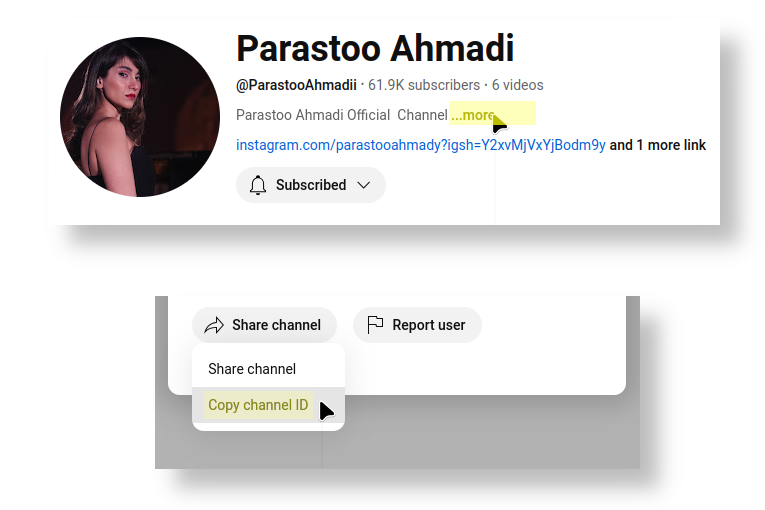
Since 2024 you can directly find the channel ID on the YouTube channel website:
In the center of the channel page, find an click ... more below the channel description.
Click Share channel and then Copy channel ID. The channel ID is now copied to your clipboard.
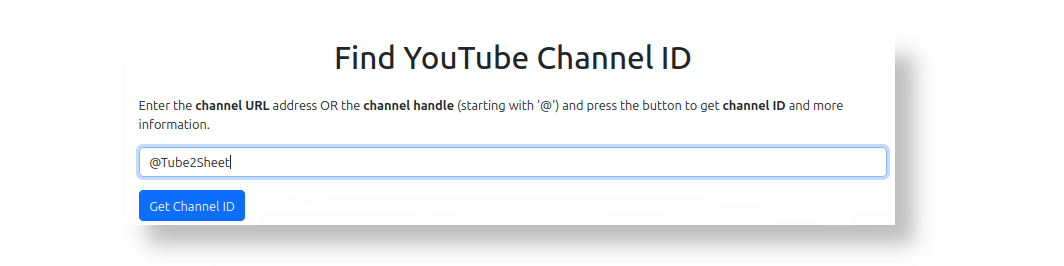
The easiest way is to use our Free Channel Id finder tool to fetch the channel ID.
Simply paste a channel's handle or URL address into our tool to get the channel ID and more information about any channel.
Navigate to the channel https://www.youtube.com/@PewDiePie.
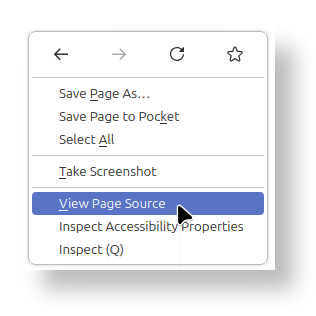
Right-click at any area on the web page in your web browser.
Select "View page source" from the dropdown menu.
Press "Strg+F" to search for /channel/.
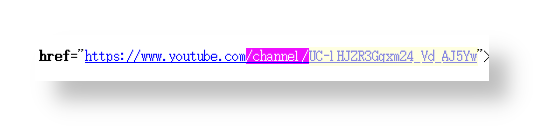
In this example, the Channel Id is UC-lHJZR3Gqxm24_Vd_AJ5Yw
The channel address (URL) is: https://www.youtube.com/channel/UC-lHJZR3Gqxm24_Vd_AJ5Yw`
Note: A YouTube Channel ID always has 24 characters and never changes.


•
Terms and ConditionsCopyright © Tube2Sheet 2024
Google Sheets™ web-based spreadsheet program and YouTube™ are trademarks of Google LLC.
